
Welcome to the AI toolkit
To get started with using our new AI toolkit:
--> Login
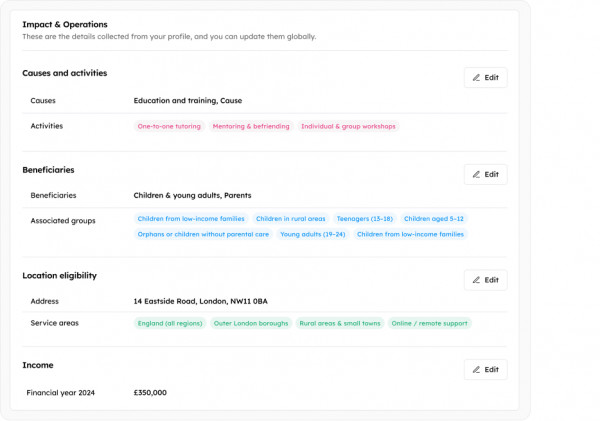
On the side menu, under 'Grants' click 'AI Profile'
This is where you input the information needed to help you project plan and find and apply for grants.
Add your website link. We scan this and your subpages for you. This creates a library of Causes and Activities based on your website.
--> Navigate to ‘Fundraising Assistant’
If you wish to use the Project Planner, click ‘Create a Project’
It will ask questions about the project, which you can answer by speaking or typing, in whatever language you are most comfortable with. It will work through all the key parts of the project you want to deliver, checking on those key points like beneficiaries, needs and objectives, evaluation and impact. You can save and come back to it anytime you like. Once the questions have all been answered the process will be complete and the planner will create a downloadable project summary, press release plus a to-do list to further improve your application. You can return to the plan to update and edit.
OR if you wish to search for grants without completing a Project Plan, on the menu click ‘AI Profile’ and fill in as many up-to-date details as you can, to ensure our tool is best placed to find grants for you.
Once your Project Plan or AI Profile (or both if you want to ensure the widest coverage) are complete, it’s time to search for a grant.
--> Navigate to ‘Grant Recommendations’ and search for grants.
Our AI Assistant will search the internet for the latest, relevant and available grant opportunities. We don’t use a database that could quickly become out of date, instead we seek out grants that are currently open and specific to you. You’ll see your first results in a few minutes, and you can schedule the toolkit to do a regular search to ensure you never miss out on opportunities.
When you have found grants that fit your organisation and goals. It’s time to start your application,
--> Navigate to ‘Bid Writer’ and our AI tool to help answer grant application questions.
Copy and paste the questions from the funder’s grant application form into the tool, using the information you’ve already given us, our tool will generate answers, review and finesse them yourself. Download to share with your colleagues for their input and feedback.
--> Use what the tool has helped you draft as your answers on the funder’s application form.
All your grant applications can be tracked on our platform, and our clever tool is always learning, so a successful application would be used to support further applications, improving it further.
Of course, this is your data, and you have complete control of the process and how it’s used!
If you need further help, contact our Community Team Help@Localgiving.org
About Localgiving
Localgiving is a leading online fundraising platform and grant delivery partner, focused on supporting small charities, CICs, and community organisations. Since 2010, we’ve helped thousands of groups across the UK raise tens of millions of pounds and make a meaningful impact in their local communities.
Our platform offers an easy-to-use suite of powerful fundraising tools alongside AI-powered support for finding and applying for grants—equipping organisations with everything they need to grow and succeed.
We also collaborate with major partners, including National Grid and Scottish Power, to deliver corporate grant programmes and connect funding with the communities that need it most.
Join Localgiving today and unlock new opportunities to supercharge your fundraising.