

Welcome
Sending messages to your community
To see the list of your organisation's supporters, please click on the Supporters tab on the left side. This will bring up a list of all people who have donated to your organisation.
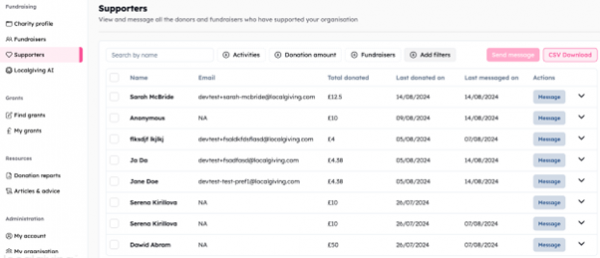
From this screen, you can see the total amount the supporter has donated, the last donation date, and the most recent date you've messaged them.
By clicking on Message, you can then write out a personalised message, send a message from a template you've created, or generate an AI thank you.
Should you wish to send updates about your organisation or any fundraising activities, you are also able to select the tick box next to a supporter's name in order to send a message to multiple people.
You can also set up an automated thank you message that is automatically sent to a supporter once they've made a donation to your main charity page or a fundraising page.
To do this, please click on the Charity Profile tab on the left. If you scroll down to the bottom of the page, you can then set up the text for the thank you message you'd like donors to receive.
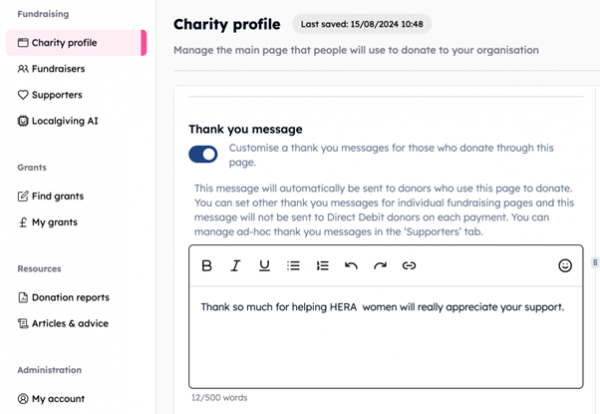
Please note you can do the same for a Fundraising page by clicking on Fundraisers > the 3 dots under actions > Edit.
About Localgiving
Localgiving is a leading online fundraising platform and grant delivery partner, focused on supporting small charities, CICs, and community organisations. Since 2010, we’ve helped thousands of groups across the UK raise tens of millions of pounds and make a meaningful impact in their local communities.
Our platform offers an easy-to-use suite of powerful fundraising tools alongside AI-powered support for finding and applying for grants—equipping organisations with everything they need to grow and succeed.
We also collaborate with major partners, including National Grid and Scottish Power, to deliver corporate grant programmes and connect funding with the communities that need it most.
Join Localgiving today and unlock new opportunities to supercharge your fundraising.